Software that runs your business, not just a website that describes it.
Custom web applications — dashboards, portals, internal tools, and SaaS products — built on real architecture, with authentication, data, and integrations designed to hold up under actual use.
A website tells people about your business. An application runs it.
Spreadsheets held together with formulas, three disconnected tools your team copy-pastes between, a process only one person understands — that's what a custom web application actually replaces. Not a redesign. A real piece of software your operations can depend on.
Operational dashboards and internal portals replacing manual spreadsheets and disconnected tools.
Account areas, booking systems, and client dashboards your customers can use without calling support.
Multi-tenant, role-based applications architected for growth, not just an MVP demo.
Every build is scoped on its own — here's how we plan it, regardless of size.
A simple internal tool and a multi-role SaaS platform don't take the same time — we won't pretend otherwise. The phases below apply either way; the timeline gets scoped once architecture is defined.
Scoping & Architecture
Requirements, data model, and system architecture defined and signed off before development starts.
Development Sprints
Built in short review cycles, with working versions to test — not one long silent build before a single reveal.
QA & Testing
Functional, security, and load testing before launch — issues found here, not by your first real users.
Deployment & Handover
Deployed to production with documentation and a support plan, so launch day isn't the last time we're involved.
What's actually in the build.
A working, deployed application — with the pieces that keep it running after launch, not just a demo.
- Custom application architecture
- Database design & API development
- User authentication & role-based access
- Admin dashboard & reporting
- Third-party integrations (CRM, payments, etc.)
- Automated & manual QA testing
- Cloud deployment & hosting setup
- Post-launch support & maintenance plan
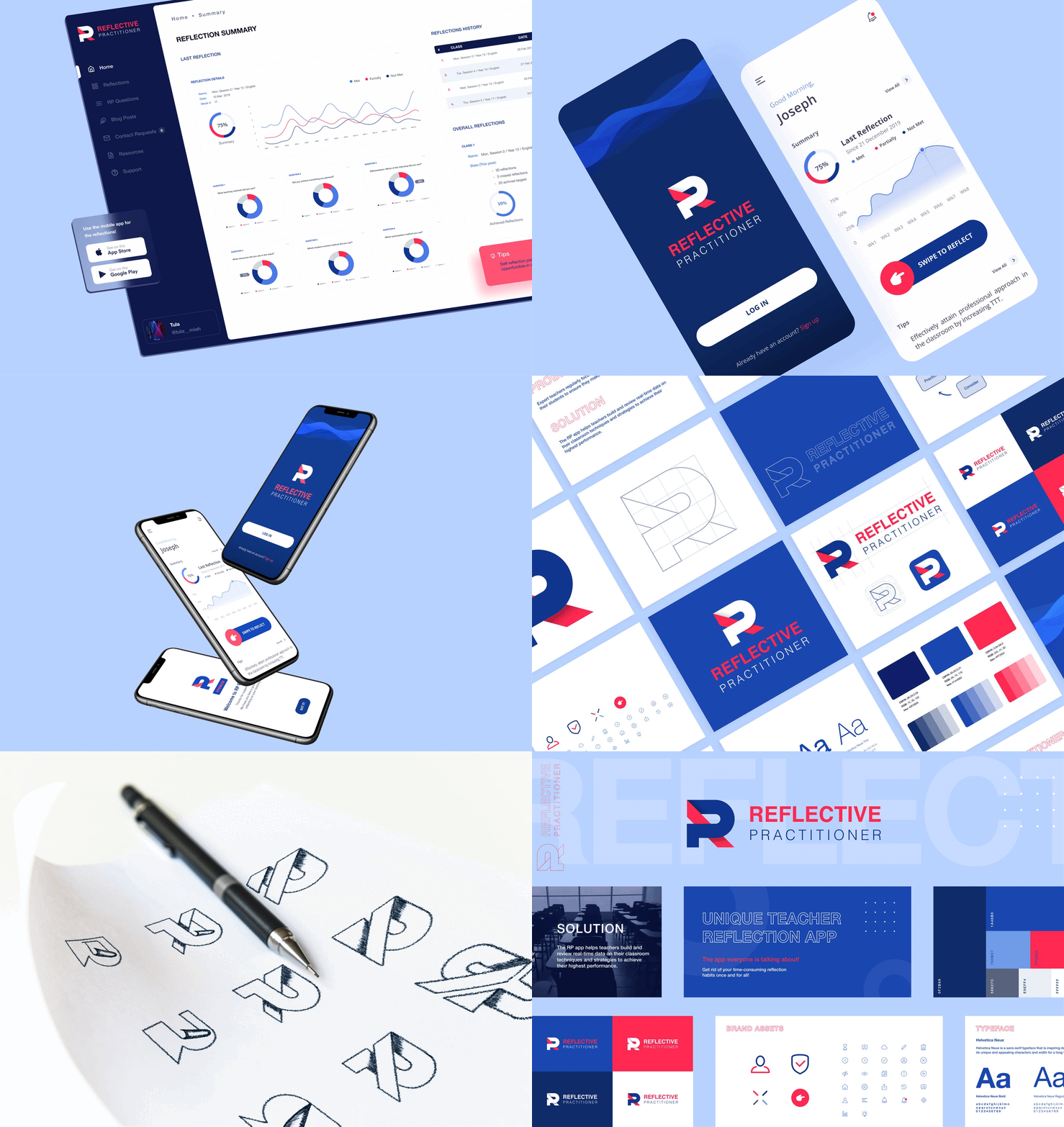
Reflective Practitioner
A teacher development platform built as a web dashboard with native iOS and Android apps on a shared backend — designed for 60-second mobile reflections and deep weekly analysis on the web.
Before you ask, you might wonder…
Web Application covers custom, logic-heavy software — dashboards, portals, SaaS products with real data models and user roles. Web Development covers building out standard websites, including implementing designs from our Web Design service. Many projects need only one; some need both.
It helps but isn't required — our Product/App Design service can run first to define the UX and UI, or we can work from designs you already have.
The stack is chosen per project based on scope, integrations, and your team's existing systems — discussed and agreed during the scoping phase, not fixed in advance.
Yes — a technical audit of the existing codebase comes first, so we can give you an honest assessment of what's salvageable before committing to a plan.
A maintenance and support plan is scoped as part of every build — covering bug fixes, hosting, and updates, sized to how critical the application is to your operations.
Replace the workaround with real software.
Free 30-minute discovery call. Bring the spreadsheet or the process nobody enjoys — we'll tell you honestly if it's worth building.
Software that runs your business, not just a website that describes it.
Custom web applications — dashboards, portals, internal tools, and SaaS products — built on real architecture, with authentication, data, and integrations designed to hold up under actual use.
A website tells people about your business. An application runs it.
Spreadsheets held together with formulas, three disconnected tools your team copy-pastes between, a process only one person understands — that's what a custom web application actually replaces. Not a redesign. A real piece of software your operations can depend on.
Operational dashboards and internal portals replacing manual spreadsheets and disconnected tools.
Account areas, booking systems, and client dashboards your customers can use without calling support.
Multi-tenant, role-based applications architected for growth, not just an MVP demo.
Every build is scoped on its own — here's how we plan it, regardless of size.
A simple internal tool and a multi-role SaaS platform don't take the same time — we won't pretend otherwise. The phases below apply either way; the timeline gets scoped once architecture is defined.
Scoping & Architecture
Requirements, data model, and system architecture defined and signed off before development starts.
Development Sprints
Built in short review cycles, with working versions to test — not one long silent build before a single reveal.
QA & Testing
Functional, security, and load testing before launch — issues found here, not by your first real users.
Deployment & Handover
Deployed to production with documentation and a support plan, so launch day isn't the last time we're involved.
What's actually in the build.
A working, deployed application — with the pieces that keep it running after launch, not just a demo.
- Custom application architecture
- Database design & API development
- User authentication & role-based access
- Admin dashboard & reporting
- Third-party integrations (CRM, payments, etc.)
- Automated & manual QA testing
- Cloud deployment & hosting setup
- Post-launch support & maintenance plan
Reflective Practitioner
A teacher development platform built as a web dashboard with native iOS and Android apps on a shared backend — designed for 60-second mobile reflections and deep weekly analysis on the web.
Before you ask, you might wonder…
Web Application covers custom, logic-heavy software — dashboards, portals, SaaS products with real data models and user roles. Web Development covers building out standard websites, including implementing designs from our Web Design service. Many projects need only one; some need both.
It helps but isn't required — our Product/App Design service can run first to define the UX and UI, or we can work from designs you already have.
The stack is chosen per project based on scope, integrations, and your team's existing systems — discussed and agreed during the scoping phase, not fixed in advance.
Yes — a technical audit of the existing codebase comes first, so we can give you an honest assessment of what's salvageable before committing to a plan.
A maintenance and support plan is scoped as part of every build — covering bug fixes, hosting, and updates, sized to how critical the application is to your operations.
Replace the workaround with real software.
Free 30-minute discovery call. Bring the spreadsheet or the process nobody enjoys — we'll tell you honestly if it's worth building.