Interfaces people use without reading a manual.
UI/UX design is where research meets pixels — wireframes, prototypes, and interfaces tested with real users before a single line of code gets written. For web apps, mobile apps, and internal tools.
If users have to think about the interface, it's not finished.
A beautiful screen that confuses people isn't a design win — it's a support ticket waiting to happen. We design UI/UX around what real users actually do, tested before launch, not guessed at and fixed after complaints come in.
User interviews and task analysis before a single wireframe gets drawn.
Low-fidelity flows that get the logic right before visual design begins.
A working, clickable prototype tested with real users before dev starts.
Four weeks from research to a tested prototype.
Every stage ends with something you review — and the design isn't "done" until real users have clicked through it.
Research
User interviews, competitor UX audit, and task flows mapped against what your users are actually trying to get done.
Wireframes & IA
Information architecture and low-fidelity wireframes — structure and flow signed off before visual polish begins.
UI & Prototype
Full visual design applied to a clickable, interactive prototype your team can experience before build.
Testing & Handoff
Usability testing with real users, revisions from findings, then structured developer handoff files.
What's actually in the handoff.
Structured files your development team — internal or ours — can build from directly, not a static image export.
- User research & interview summary
- Information architecture / sitemap
- Low & high-fidelity wireframes
- Interactive clickable prototype
- UI component library
- Usability testing report
- RTL / Arabic layout verification
- Developer handoff specs (Figma)
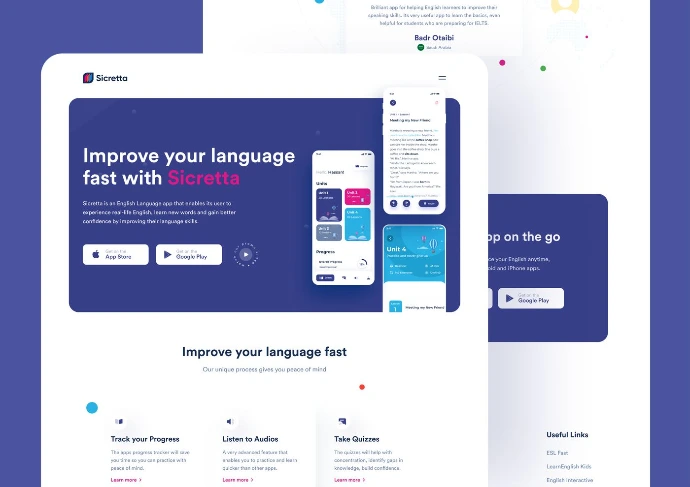
Sicretta
How we designed an English-learning mobile app that turned silent learners into confident speakers — through research-led UX and immersive, gamified conversation flows.
Read the full case study →Before you ask, you might wonder…
UI/UX is the research, structure, and interaction design layer — wireframes, flows, and tested prototypes. Web Design and Product/App Design apply that foundation to a specific marketing site or full application build. Many projects start here before moving into either.
Both — our Build practice can take the prototype straight into development, or we can hand off structured files to your existing dev team.
Figma, as standard — files are shared with your team throughout, not delivered as a surprise at the end.
For early-stage products, we recruit a small representative test group matching your target audience — five to eight sessions is usually enough to catch the issues that matter most.
Typically four weeks end-to-end across research, wireframes, prototype, and testing — larger products with more flows may run longer, scoped after the discovery call.
Design an interface people actually enjoy using.
Free 30-minute discovery call. We'll ask what your users are struggling with today — before we design anything.
Interfaces people use without reading a manual.
UI/UX design is where research meets pixels — wireframes, prototypes, and interfaces tested with real users before a single line of code gets written. For web apps, mobile apps, and internal tools.
If users have to think about the interface, it's not finished.
A beautiful screen that confuses people isn't a design win — it's a support ticket waiting to happen. We design UI/UX around what real users actually do, tested before launch, not guessed at and fixed after complaints come in.
User interviews and task analysis before a single wireframe gets drawn.
Low-fidelity flows that get the logic right before visual design begins.
A working, clickable prototype tested with real users before dev starts.
Four weeks from research to a tested prototype.
Every stage ends with something you review — and the design isn't "done" until real users have clicked through it.
Research
User interviews, competitor UX audit, and task flows mapped against what your users are actually trying to get done.
Wireframes & IA
Information architecture and low-fidelity wireframes — structure and flow signed off before visual polish begins.
UI & Prototype
Full visual design applied to a clickable, interactive prototype your team can experience before build.
Testing & Handoff
Usability testing with real users, revisions from findings, then structured developer handoff files.
What's actually in the handoff.
Structured files your development team — internal or ours — can build from directly, not a static image export.
- User research & interview summary
- Information architecture / sitemap
- Low & high-fidelity wireframes
- Interactive clickable prototype
- UI component library
- Usability testing report
- RTL / Arabic layout verification
- Developer handoff specs (Figma)
Sicretta
How we designed an English-learning mobile app that turned silent learners into confident speakers — through research-led UX and immersive, gamified conversation flows.
Read the full case study →Before you ask, you might wonder…
UI/UX is the research, structure, and interaction design layer — wireframes, flows, and tested prototypes. Web Design and Product/App Design apply that foundation to a specific marketing site or full application build. Many projects start here before moving into either.
Both — our Build practice can take the prototype straight into development, or we can hand off structured files to your existing dev team.
Figma, as standard — files are shared with your team throughout, not delivered as a surprise at the end.
For early-stage products, we recruit a small representative test group matching your target audience — five to eight sessions is usually enough to catch the issues that matter most.
Typically four weeks end-to-end across research, wireframes, prototype, and testing — larger products with more flows may run longer, scoped after the discovery call.
Design an interface people actually enjoy using.
Free 30-minute discovery call. We'll ask what your users are struggling with today — before we design anything.